
Apify Review
Should You Buy Apify?
Apify is the right choice for bettors who want sports data at near-zero cost and are comfortable with a one-time setup session. The free tier is genuinely capable; the marketplace has pre-built Actors for most major sportsbooks. Claude Code can configure a working pipeline in an afternoon. Not a substitute for a dedicated API when you need sub-second live data, but unbeatable value for historical, pre-match, and daily-refresh use cases.
Advantages
- Free tier supports 30 Actor runs per day — enough for a full personal betting pipeline
- Marketplace of pre-built sports Actors means no-code setup for common data sources
- Can collect data from any publicly accessible sportsbook or stats site — unlimited source coverage
- Claude Code / AI-assisted configuration dramatically lowers the setup barrier
- Scales from hobbyist to production on a single platform without migrating
Disadvantages
- Requires configuration — not plug-and-play compared to a dedicated API
- Scrapers can break when source websites update their HTML structure
- Higher latency than dedicated streaming APIs for live in-play data
- Residential proxy costs can add up for high-frequency or anti-bot-protected sources
| Category | Sports Data — Web Scraping Platform (Configurable) |
|---|---|
| Starting Price | Free forever (no credit card required) |
| Free Tier Limit | 30 Actor runs/day, 5GB storage, scheduled automation |
| Data Sources | Any publicly accessible website — sportsbooks, stats sites, injury feeds |
| Setup Complexity | Low (pre-built Actors) to Medium (custom Actor with AI help) |
| Best For | Budget bettors building personal data pipelines without API costs |
| Live/Real-Time | Limited — best for pre-match and daily-refresh use cases |
What is Apify?
Apify is a web scraping and browser automation platform. At its core, Apify lets you run “Actors” — containerised scraping programs — in the cloud, on a schedule, without managing servers. The platform handles browser automation, proxy rotation, data storage, scheduling, and output delivery. You run the scraper; Apify handles the infrastructure.
For sports bettors, Apify’s relevance is straightforward: sports odds, scores, statistics, and betting data exist on publicly accessible websites. If a sportsbook displays odds in a browser, a scraper can collect those odds programmatically. Apify makes this accessible to non-engineers through its Actor Marketplace, where pre-built scrapers for hundreds of popular websites — including major sportsbooks and sports data sites — are available to run immediately.
The platform’s free tier is notably generous compared to most SaaS tools. 30 Actor runs per day with full scheduling capability is sufficient to collect odds from multiple sportsbooks every 15–30 minutes throughout the day. Unlike limited-time trials, the free tier is permanent. You can build and run a complete personal betting data pipeline — covering pre-match odds from several books, daily injury reports, and historical stats — without ever paying a subscription fee.
Where Apify differs fundamentally from dedicated APIs like SportsGameOdds is in the setup requirement. A dedicated API delivers data immediately; you authenticate, call an endpoint, and get normalised JSON. Apify requires you to either find a pre-built Actor for your target source and configure its inputs, or write a custom Actor if your source is not in the marketplace. The one-time setup investment is the price you pay for the cost savings.
Who Should Use Apify?
-
Bettors who want sports data at near-zero recurring cost. If you are building a personal +EV model or betting spreadsheet and cannot justify $50–$100/month for a dedicated API, Apify’s free tier is the best alternative. You can collect real data from real sportsbooks for free, indefinitely, once your pipeline is configured.
-
Analysts needing historical data that APIs do not store. Most dedicated odds APIs only return current and near-historical lines (usually 30–90 days). If you need odds history going back years for backtesting a model, scraping historical data archives and record-keeping sites via Apify is often the only way to build that dataset.
-
Developers who want to scrape sources with no dedicated API. Some sportsbooks, local bookmakers, or regional betting sites will never have a dedicated API provider covering them. Apify gives you the infrastructure to scrape any public website, expanding your data universe far beyond what API-covered books offer.
-
Teams using Claude Code or AI-assisted development. Claude Code is particularly effective at writing Apify Actors. Describe your target source (e.g., “scrape the moneyline odds table from ESPN BET’s NFL page”), and Claude Code can produce a working Cheerio or Playwright-based Actor in a single session. Several community members have reported complete pipeline builds in under two hours using this approach.
-
Bettors who want to avoid API rate limits on high-frequency data. Apify’s scraping infrastructure is not rate-limited in the same way as paid API tiers. If you are collecting odds from multiple sources at high frequency and find API rate limits a binding constraint, scraping via Apify bypasses that limitation (subject to respectful use and source websites’ terms of service).
-
Non-technical bettors willing to invest a one-time setup session. The Actor Marketplace removes the coding barrier for common use cases. If a pre-built Actor already covers your target sportsbook, setup is as simple as clicking “Try for free”, entering your inputs (target URL, frequency), and scheduling the run. No code required.
Key Features
The Actor Marketplace
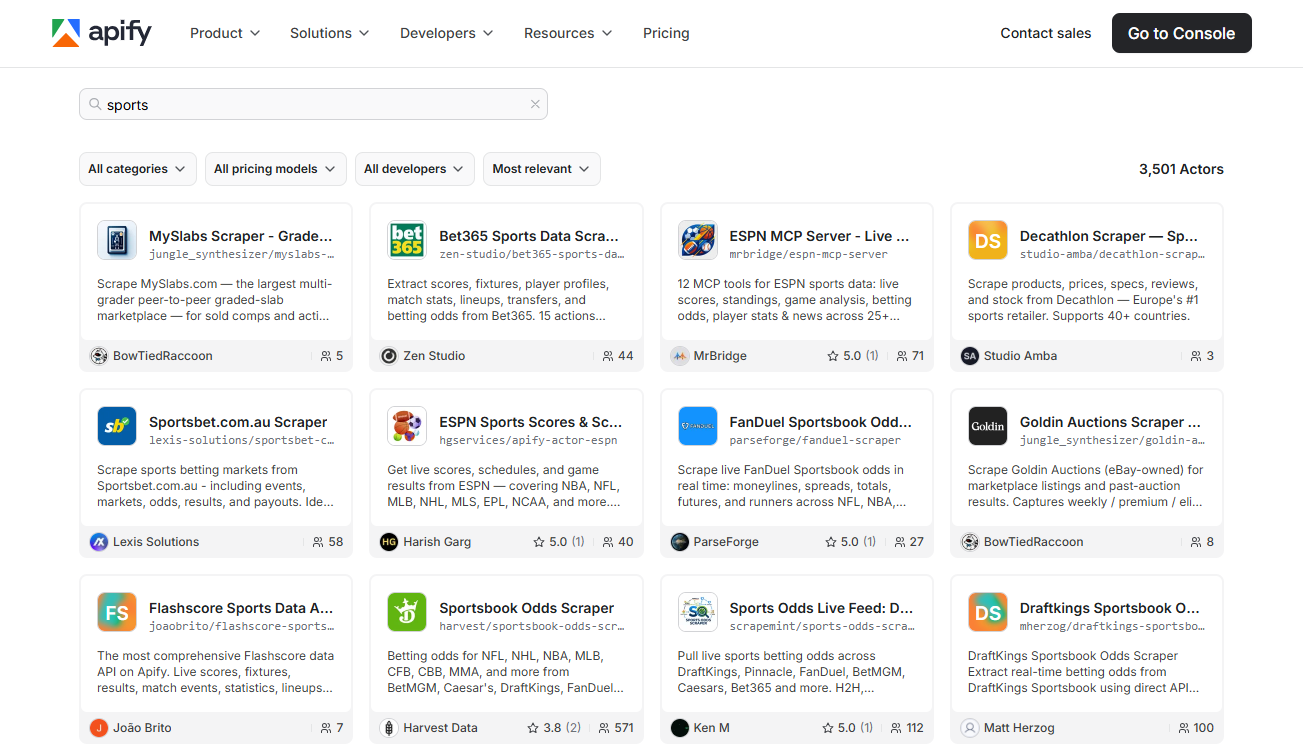
Apify’s Actor Marketplace is the platform’s most valuable feature for sports bettors. It contains thousands of pre-built, community-maintained scraping programs covering virtually every major website category. For sports use cases, you can find Actors for:
- Major US sportsbooks (DraftKings, FanDuel, BetMGM, ESPN BET, Caesars)
- Sports statistics aggregators (ESPN, CBS Sports, FantasyPros)
- Odds comparison sites (OddsShark, covers.com)
- Injury report feeds (Rotowire-style sites)
- Historical database scraping
Running a marketplace Actor requires no code. You click “Try for free”, configure the input schema (usually just a target URL and a few options), and click Run. The Actor executes in Apify’s cloud, collects the data, and returns structured output to your dataset. You can then download the dataset as JSON, CSV, or connect it to downstream tools via webhook.
The quality of marketplace Actors varies — community-built scrapers may lag when source sites update, while Apify-verified Actors tend to be more reliably maintained. Before building anything, spend 10 minutes searching the store for existing Actors covering your target sources. In most cases something already exists.
Scheduling and Automation
Every Actor on Apify can be scheduled using cron syntax. You can run a sportsbook odds scraper every 15 minutes from 9am–midnight during peak betting hours, or a daily injury report scraper at 8am each morning. The scheduled runs execute reliably in Apify’s cloud — you do not need a server running 24/7 on your end.
Schedule automation is included in the free tier. Setting up a fully automated data collection pipeline that runs continuously does not require a paid plan. The limitation is 30 Actor runs per day — which means if you schedule a single Actor to run every 30 minutes across a 15-hour window, that is exactly 30 runs per day. Plan your schedule around the free tier limit if you want to maintain zero cost.
Data Storage, Webhooks, and Integrations
Actor output is saved to Apify’s dataset storage. Datasets can be accessed via API, downloaded as JSON or CSV, or monitored for new records via webhook. This enables simple integrations: new odds data triggers a webhook that pushes records to your database, Google Sheet, or Slack channel.
Apify connects natively to Zapier and Make (formerly Integromat), meaning you can build no-code pipelines that route Actor output to any of hundreds of downstream services without writing integration code. For bettors using Google Sheets as their analysis environment, a Zapier automation that appends new records from an Apify dataset to a sheet every time an Actor runs takes about 15 minutes to configure.
Custom Actor Development (with Claude Code)
For sources not covered by the marketplace, Apify provides a full Actor SDK for Node.js (JavaScript/TypeScript) and Python. Actors are Docker containers — you write the scraping logic, Apify handles the runtime. The SDK includes utilities for browser automation (Playwright, Puppeteer), HTTP-based scraping (Cheerio, Got), proxy rotation, retry logic, and data persistence.
Using Claude Code to write a custom Actor dramatically reduces the barrier. A practical workflow:
- Open a browser and navigate to your target sportsbook or stats site manually
- Identify the URL pattern and page structure for the data you want
- Describe the target to Claude Code: “I need an Apify Actor that scrapes the moneyline odds table from [URL]. The table has columns for team, spread, moneyline, total. Return each row as a JSON object.”
- Claude Code produces a working Actor (Cheerio for static pages, Playwright for JavaScript-rendered pages)
- Deploy to Apify, run once to verify output, then schedule
This workflow — browser observation + Claude Code generation + Apify deployment — is repeatable for any publicly accessible site. Developers in the betting community have used this approach to build scrapers for regional books that have no official API coverage.
The Honest Tradeoffs
Apify’s value proposition requires an honest assessment of where it falls short compared to a dedicated API:
Latency: Scraping takes longer than an API call. A simple Actor run takes 10–30 seconds; a complex browser automation Actor might take 2–5 minutes. For pre-match odds and daily data refresh, this does not matter. For live in-play arbitrage, this is a fundamental disqualifier. If you need sub-5-second odds updates for live betting, use a dedicated streaming API.
Maintenance: Scrapers break when source websites update their HTML. A dedicated API abstracts this problem — if DraftKings changes their site structure, the API provider fixes it. With Apify, when a scraper breaks, you or the Actor author has to fix it. Marketplace Actors depend on community maintenance; custom Actors depend on you. Build in a mental model of checking your Actors monthly and updating when they fail.
Terms of Service: Automated scraping of sportsbook websites may conflict with their terms of service. Check the terms for any site you scrape. Using proxies and rate-limiting your requests to resemble human browsing patterns is best practice. Apify provides residential proxy support (on paid plans) for sources that block datacenter IPs.
Schema instability: Unlike a purpose-built API with a versioned schema, scrapers return whatever the source HTML provides. Field names, data types, and structures can change without notice. Build defensive parsing into your downstream code and validate output schemas regularly.
Apify vs SportsGameOdds: Which to Choose
| Dimension | Apify | SportsGameOdds |
|---|---|---|
| Setup time | 30 min (pre-built Actor) to 2h (custom) | 15 min (API key + curl test) |
| Monthly cost | Free for personal use | $49+/month (after free tier) |
| Data freshness | Minutes (polling) | Seconds (dedicated feed) |
| Live in-play data | Not recommended | Yes (WebSocket on Business) |
| Global source coverage | Any public website | 40+ integrated sportsbooks |
| Line history | Depends on what you scrape | Built-in endpoint |
| Maintenance required | Yes — scrapers can break | No — API provider maintains |
| Scales to commercial use | Yes (paid plans) | Yes (paid plans) |
Choose Apify if: You are cost-sensitive, comfortable with initial setup, and primarily need pre-match or daily-refresh data. The free tier is genuinely capable for personal tools.
Choose SportsGameOdds if: You need line movement data, live odds with low latency, or a production-grade service where you do not want to manage scraper maintenance.
Use both if: You use SportsGameOdds for US main-line real-time odds and Apify for supplementary data sources not covered by the dedicated API — historical records, regional books, or niche stats sites.
Free Tier Reality Check
The Apify free tier includes:
- 30 Actor runs per day (sufficient for a full personal pipeline)
- 5GB dataset storage (enough for months of odds data)
- Scheduled automation (unlimited schedules, runs count against daily limit)
- API access to your datasets (download your data anytime)
- 3 proxies (datacenter, suitable for most sports sites; residential requires paid plan)
In practice, a bettor tracking pre-match odds from 4 sportsbooks at 30-minute intervals across a 12-hour window (8am–8pm) uses 24 Actor runs per day. That is within the free limit with 6 runs to spare for other data needs (injury reports, historical stats). The free tier is not a marketing trick — it supports meaningful production workloads.
Getting Started in One Afternoon
The fastest path to a working Apify sports pipeline:
-
Create your free account at apify.com — no credit card
-
Search the Actor Marketplace for your target sportsbook or data source. Try terms like “DraftKings”, “FanDuel”, “ESPN odds”, “sportsbook odds”. Run the most relevant Actor once to test.
-
If no Actor exists, open the Apify Console and create a new Actor. Paste this prompt into Claude Code: “Write an Apify Actor using Cheerio that scrapes [target URL] and returns JSON with fields [list fields]. The page uses [static HTML / JavaScript rendering].” Deploy the generated code.
-
Schedule your Actor using Apify Schedules. Set the cron expression for your desired frequency. Enable failure notifications so you know when something breaks.
-
Connect your output using a webhook or download the dataset as CSV/JSON. For Google Sheets users, the Apify + Zapier integration makes this no-code.
Verdict
Apify is the right choice for any bettor or developer who wants sports data on a budget and is willing to invest an afternoon in setup. The free tier is generously capable, the Actor Marketplace eliminates most of the coding work for common sources, and AI coding assistants like Claude Code have removed the technical barrier for custom scrapers.
The tradeoffs are real: scrapers require periodic maintenance, latency is higher than dedicated APIs, and live in-play use cases are not well-served. For serious production tools requiring guaranteed uptime and sub-second data, a dedicated API like SportsGameOdds is the appropriate choice.
But for personal betting analytics, model research, historical data collection, and supplementary source coverage beyond what dedicated APIs provide, Apify at zero cost is genuinely hard to beat.
Recommended for: Budget-conscious bettors, analysts building research pipelines, and developers who want flexible data collection across sources not covered by commercial APIs.
Not recommended for: Live in-play arbitrage, commercial applications requiring SLA guarantees, or situations where scraper maintenance is not acceptable.
Apify Customer Reviews & Community Sentiment
We monitored Reddit (/r/sportsbook), Trustpilot, and private Discord servers to see how the actual user base perceives Apify in day-to-day operation.
Most Mentioned Strengths
- Free tier genuinely useful
- Massive Actor marketplace
- Easy to automate with schedules
Most Mentioned Weaknesses
- Setup requires technical effort
- Actor maintenance after site changes
How to Get Started with Apify (5-Minute Setup)
Create free Apify account
Sign up at apify.com — free tier activates immediately with no credit card. You get 30 Actor runs per day, storage, and scheduling.
Browse the Actor Marketplace
Search the Apify Store for existing sports Actors. Search 'sportsbook', 'odds', 'ESPN', 'DraftKings' — many pre-built scrapers already exist and work out of the box.
Test a pre-built Actor
Click 'Try for free' on any relevant Actor. Run it once with default settings to confirm it returns the data you need. Inspect the output schema.
Configure inputs and schedule
Set up a recurring Schedule (cron syntax) to run the Actor automatically — e.g., every 15 minutes for pre-match odds or once daily for historical stats.
Export or webhook the data
Connect the Actor output to a Google Sheet, webhook URL, or database via the built-in integrations. No code required for basic pipelines.
Use Claude Code for custom needs
If you need a custom scraper for a source not in the marketplace, describe the target website to Claude Code. It can write a complete Apify Actor in one session.
Apify
Start using Apify today. Most users see ROI within the first week.
Try Apify Now →Affiliate link. We may earn a commission at no extra cost to you. Learn more.